Overview
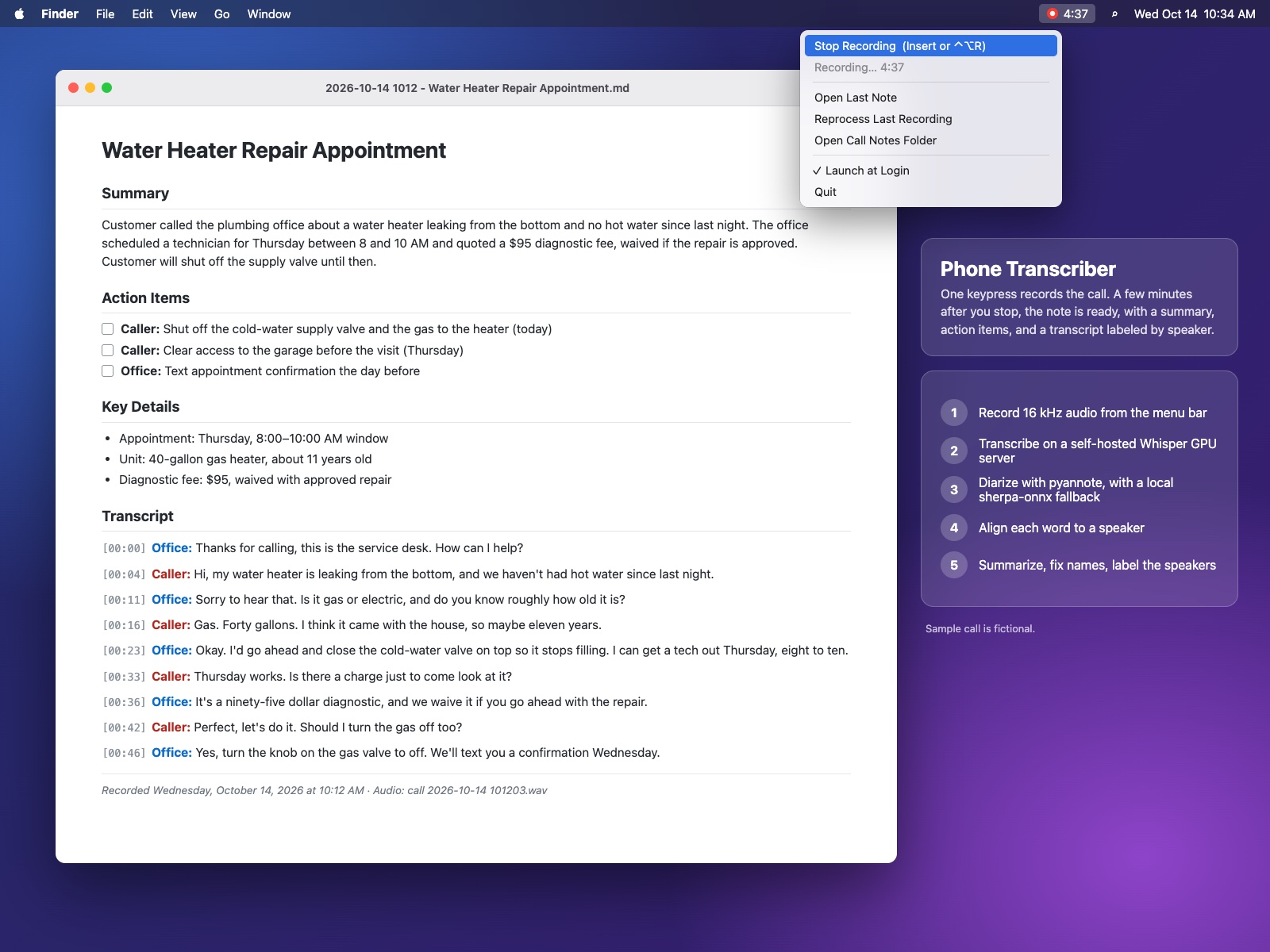
Phone Transcriber is a native macOS menu bar app I wrote in Swift that turns a speakerphone call into a finished Markdown note: a summary, action items, key details, open questions, and a full transcript with every line labeled by speaker. One keypress starts recording, a second keypress stops it, and a few minutes later a notification opens the note. Transcription and speaker diarization run on my own GPU server, with a CPU fallback on the Mac, so the audio never goes to a third-party transcription service.
The Challenge
I take a lot of calls with clients, vendors, and contracting officers, and taking notes while you're trying to listen is a bad trade. Off-the-shelf recorders give you a wall of text with no idea who said what. On a business call, who promised what is the whole point. The audio is also exactly the sort of thing I don't want sitting on someone else's cloud. So I needed a tool that stayed out of the way during the call, kept processing on hardware I control, labeled speakers correctly even through quick back-and-forth, and got client names and industry jargon right instead of guessing at them.
What I Built
- Native Swift menu bar app — An AppKit status-bar app (no Dock icon) built with a plain
swiftcbuild script. It records 16 kHz mono 16-bit WAV through AVFoundation (about 2 MB per minute, the format Whisper uses internally), shows a live elapsed timer in the menu bar, keeps the Mac from sleeping mid-call, and quietly throws away accidental recordings under 3 seconds. - Global hotkeys without Accessibility permission — Carbon hotkeys (a single Insert key, with Ctrl+Opt+R as a fallback) toggle recording from any app. A stable code-signing identity means macOS keeps the microphone and notification permissions across rebuilds.
- Self-hosted transcription — Audio goes to a faster-whisper server on my GPU box. Before upload, the pipeline builds a prompt and hotword list from a plain-text vocabulary file and from whatever calendar event is on the schedule within 15 minutes of the call start (read with icalBuddy), so names like "Call with the Acme rep" get spelled correctly.
- Speaker diarization with failover — A small Flask service running pyannote's community-1 pipeline on CUDA handles the diarization and returns non-overlapping speaker turns. If that server can't be reached, the pipeline falls back to sherpa-onnx (pyannote segmentation plus a WeSpeaker ResNet34 embedding model) running locally on the Mac CPU. It defaults to two speakers and supports auto-detection for conference calls.
- Word-level speaker alignment — Each Whisper word is matched to the diarization turn it overlaps most, with nearest-turn fallback, so a segment that crosses a handoff gets split between speakers rather than handed whole to one of them. Consecutive words are then merged back into timestamped turns.
- LLM summary and self-correction — An LLM writes the structured note and also returns two machine-readable lines: misheard proper nouns mapped to the correct spellings, and speaker letters mapped to names or roles. The pipeline applies both to the transcript, so "Speaker B" turns into the caller's actual name.
- Nothing gets lost — The raw transcript is written to disk before summarization begins. If the summary fails, the app reports "transcript saved, summary failed" and offers a one-click Reprocess Last Recording.
Results
I went from first commit to a working app with speaker-labeled, named transcripts in a single morning, across eight commits. Calls I take on speakerphone now end up as searchable notes in one folder, with action items I can check off, and none of the call audio is sent to a commercial transcription API. The Python pipeline runs directly from the repo, so I can tune prompts or diarization without rebuilding the app.
Tech Stack
Swift, AppKit, AVFoundation, Carbon HotKeys, UserNotifications, ServiceManagement, Python, faster-whisper, pyannote.audio (community-1), PyTorch/CUDA, sherpa-onnx, ONNX, WeSpeaker, Flask, systemd, icalBuddy, Claude (headless CLI), Markdown